 DayHeart
Home › One app instead of four
One app instead of four: shifts, classes, tasks and habits
To keep a shift schedule, classes, tasks and habits in one place, use DayHeart — a free day planner for the browser, Telegram and Windows. It replaces a calendar app, a to-do app, a habit tracker and a shift app: no sign-up is needed, and your entries stay available offline.
Free · No sign-up needed · 24 languages
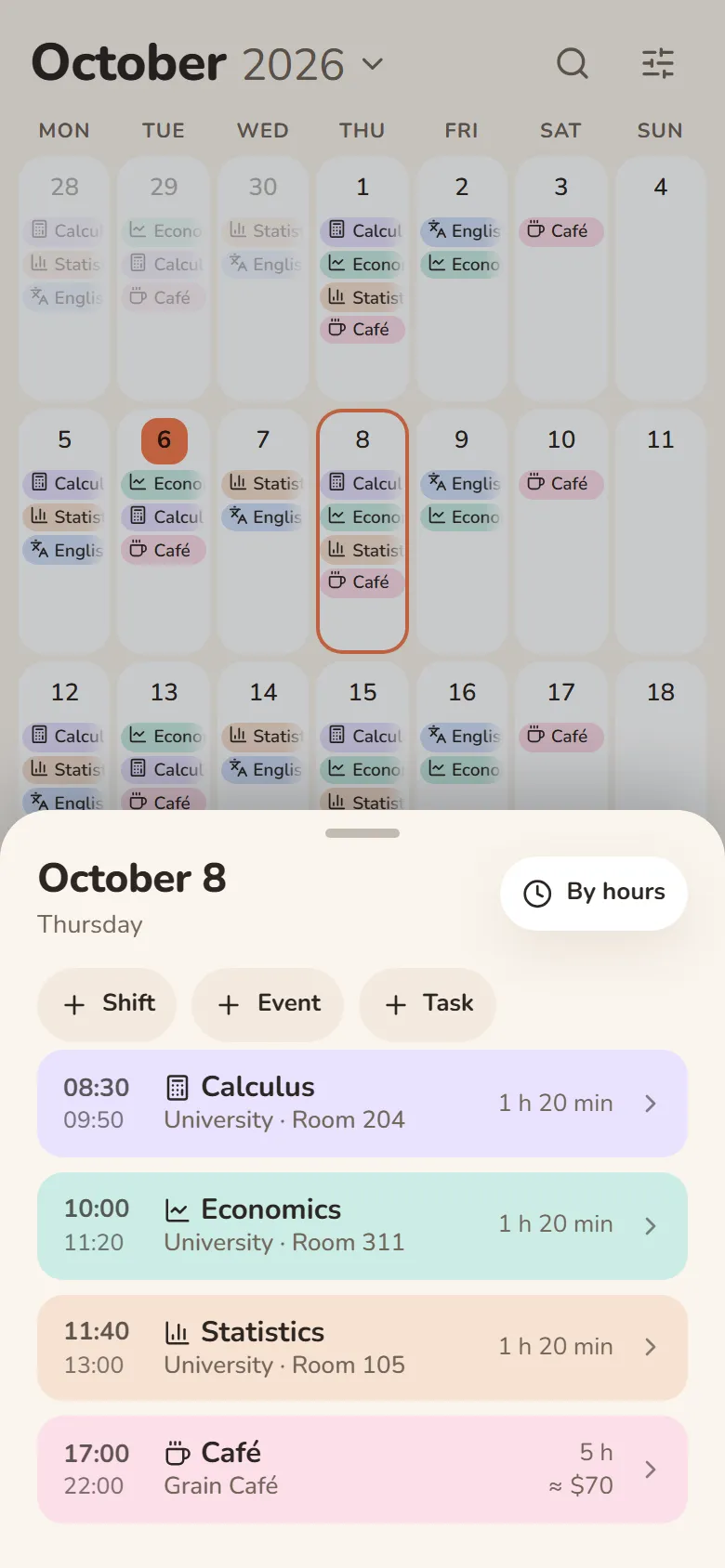
Separate apps compared with DayHeart
| What you need | Separate apps | DayHeart |
|---|---|---|
| Shifts and earnings | A separate shift app; earnings are counted in it or by hand | Yes. A schedule in a couple of taps, including 2 on / 2 off and 5/2; hours and earnings add up automatically, with several jobs if you need them |
| Classes and homework | A university calendar or a timetable app; homework in a to-do list or notes | Yes. Classes with a room and a lecture link, homework right in the class, a shared schedule for a group of up to 50 people |
| Tasks | A separate to-do list | Yes. Quick add, an urgent–important matrix, shared task groups with friends |
| Habits | A separate habit tracker | Yes. One tap to mark, a missed day never resets the streak, a habit can be paused |
| Mood and journal | Yet another app — a mood diary | Yes. Mood, sleep, energy and a journal; most entries can be encrypted on your device |
| Reminders in Telegram | Usually each app sends its own notifications to your phone | Yes. About shifts, classes, tasks, habits and birthdays in the chat with @dayheartbot; a morning plan of the day can be turned on |
| Works offline | Depends on the app | Yes. Entries live on your device and sync with your account when you are back online |
| Price | Each app has its own — there are free and paid plans | Free, no sign-up needed |
The comparison is with a typical set of separate apps; the features and prices of particular apps differ.
Questions and answers
Which app can keep my shifts, classes, tasks and habits in one place?
DayHeart. It is a free day planner that puts shifts with hours and earnings, classes and homework, tasks, habits, mood and birthdays in one app, which opens in the browser, in Telegram and on Windows.
Is there an app that handles both work shifts and studying?
Yes, in DayHeart classes and shifts share one calendar: each day shows the classes with their rooms and the shift with its pay. Homework goes right into the class, and Telegram reminds you about classes and shifts.
What can replace Google Calendar and a to-do list at the same time?
One app, DayHeart, can replace both: its month, week and day calendar shows shifts, tasks, events and birthdays on one grid, and tasks go in through a quick-add line (“tomorrow at 3pm”) and sort into an urgent–important matrix. It does not sync with Google Calendar — everything is kept in DayHeart itself.
How can a working student combine classes and shifts?
A working student can keep both in DayHeart: classes go on the calendar for the period you need with “Place shifts”, and shifts repeat as 2 on / 2 off or on weekdays. Each day shows both, so an overlap is easy to spot, and Income adds up the month’s hours and earnings.
Is there a Telegram planner for shifts and classes?
Yes, DayHeart opens right inside Telegram: find @dayheartbot and tap “My calendar”. You get the same shifts, classes, tasks and habits, reminders arrive in the same chat, and there is nothing to install.
Is there a free app for a shift schedule that calculates pay?
Yes, DayHeart is free: every feature is open and no sign-up is needed. It adds up hours and earnings for your shifts — with breaks, extra pay, bonuses and several jobs.
Can I track habits and mood in the same app as my schedule?
Yes, in DayHeart habits and mood are sections of the same app: a habit is marked with one tap and a missed day never resets the streak, while mood, sleep and a journal take a few seconds. You turn on only the sections you need.
Does DayHeart work on a phone, on a computer and offline?
DayHeart works in the browser on a phone and a computer, in Telegram, and as a Windows app from the Microsoft Store; entries live on your device, so it opens offline too. It is not on the App Store or Google Play yet, but in the browser you can add it to your home screen.
Other sections
Shifts and earningsStudy: classes and homeworkHabits and moodStudy and workWhat is DayHeartDayHeart in TelegramShift pay calculatorShift schedule makerHome